

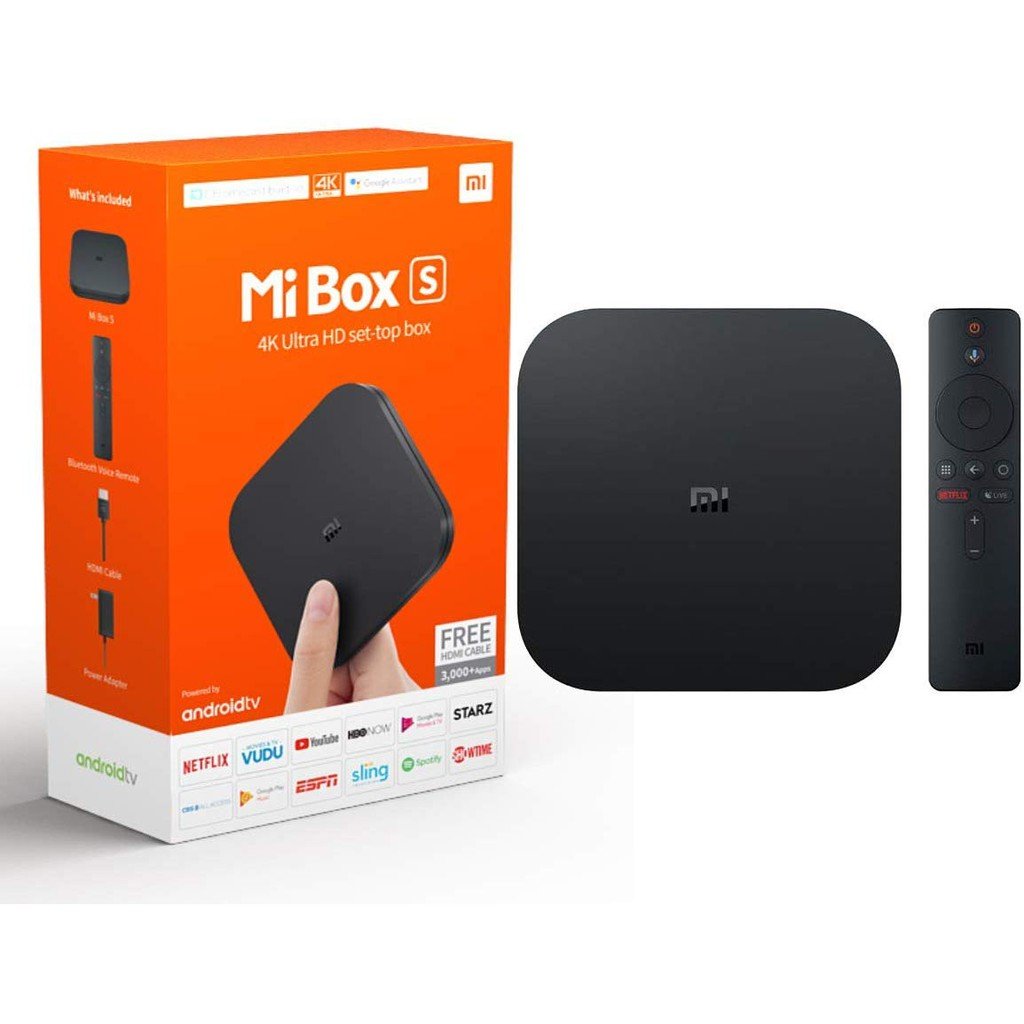
If you just want the answer: the Xiaomi Mi Box S is the one to buy, at ₱2,699, because it is the only pick here running Xiaomi's current Google TV software with Dolby Vision and Dolby Atmos built in, backed by a name every Philippine electronics retailer already carries. The rest of this guide covers seven other Android TV boxes for specific needs, from a sub-₱1,000 option to Amazon's hands-free Alexa box. We reviewed all ten boxes previously on this page against their current manufacturer and retail status on 24 September 2026: the NVIDIA SHIELD TV Pro has been discontinued by NVIDIA itself and is no longer in production anywhere, and the Ipason Ubox 10 could not be confirmed at a sensible current price, so both were dropped rather than carried forward.
Contents
- How we chose these eight
- Best overall: Xiaomi Mi Box S
- Cheapest option: MXQ Pro 4K HD
- Best 3D graphics: T95 Android TV Box
- Best for 4K streaming: Onn 4K
- Best for cloud gaming: H96 Max 3528 Smart
- Best Google Assistant: Strong Leap S-1
- Best voice control: Roku Express 4K
- Best for Alexa users: Amazon Fire TV Cube
- Buying an Android TV box in the Philippines
- Frequently asked questions
- Related guides
- Change log
 Xiaomi Mi Box S₱2,699Lazada
 MXQ Pro 4K HD₱999Lazada
 Onn 4K₱1,990Lazada
 Roku Express 4K₱2,495Lazada
 Strong Leap S-1₱2,900Lazada
 Amazon Fire TV Cube₱5,995Lazada
 H96 Max 3528 Smart₱1,999Lazada
 T95 Android TV Box₱1,415Lazada
How we chose these eight
We started from the ten boxes previously on this page. NVIDIA has confirmed, and multiple 2026 tech outlets have reported, that both the SHIELD TV and SHIELD TV Pro are out of stock at every official retailer with no restock date, which is NVIDIA's own definition of discontinued; we removed it rather than recommend a box with no future software support guaranteed. The Ipason Ubox 10 was priced at ₱8,199, close to a premium box, for specifications a ₱2,000 box on this list already matches or beats, and we could not confirm that price reflects a current, sensible listing, so it was dropped too rather than risk recommending a bad deal.
The eight that remain are still listed for sale through Lazada Philippines and Shopee Philippines, and we checked each buy link on this page resolves to a live product page rather than an empty search box or a 404, which is the most common way a listicle button quietly stops working. We did not independently re-verify every seller's exact live price against the manufacturer, since none of these ten boxes is officially distributed in the Philippines except Xiaomi: treat the prices below as the band each box has sold at recently, and check the live listing before paying.
| Android TV box | Price | Memory | OS | Notable |
|---|---|---|---|---|
| Xiaomi Mi Box S | ₱2,699 | 2GB | Google TV | Dolby Vision + Atmos |
| MXQ Pro 4K HD | ₱999 | 8GB | Android 9.1 | Cheapest 4K option |
| T95 Android TV Box | ₱1,415 | 4GB | Android 10 | 3D graphics chip |
| Onn 4K | ₱1,990 | 2GB | Google TV | Built-in Chromecast |
| H96 Max 3528 Smart | ₱1,999 | 4GB | Android 13 | Wi-Fi 6 |
| Strong Leap S-1 | ₱2,900 | 2GB | Android 10 | Google-certified |
| Roku Express 4K | ₱2,495 | 1GB | Roku OS | Apple AirPlay 2 |
| Amazon Fire TV Cube | ₱5,995 | 2GB | Fire OS | Hands-free Alexa |
Best overall: Xiaomi Mi Box S
The Android TV box most Filipino buyers already trust, with genuine Google TV software and Dolby Vision plus Dolby Atmos built in.
Xiaomi is the one brand on this page with an actual retail presence in the Philippines, through Mi Stores and its own authorised online store, which means genuine after-sales support if something goes wrong. The Mi Box S runs Google TV, Google's own current interface, with Dolby Vision and Dolby Atmos support built in, so the 4K content you already pay for on Netflix or Disney+ actually looks and sounds the way it was mastered.
Its 2GB of memory is the weak point: the interface can lag if you have a dozen apps installed and switch between them constantly. If that bothers you, the H96 Max below runs a newer Android version on similar hardware. For most people buying one box to replace a dumb TV's missing smart features, this is the safest first purchase.
Cheapest option: MXQ Pro 4K HD
The cheapest way into 4K Android streaming, under ₱1,000, if you can live with no brand-name support line.
Under ₱1,000, this is the least you can spend and still get a box that outputs 4K and runs a real (if dated) version of Android. It is a generic brand rather than a name Xiaomi or Amazon would put on a shelf, and the Mali-450MP graphics chip is entry-level, but it plays Netflix, YouTube and TFC without drama.
There is no Philippine warranty line to call if it fails outside the seller's own return window, and Android 9.1 is old enough that a handful of newer apps may eventually stop supporting it. Treat this as a bedroom or spare-room box, not the one you buy once and expect to last five years.
Best 3D graphics: T95 Android TV Box
The cheapest box here with a genuine 3D graphics chip, built for smoother menu animation, not real gaming.
The T95 is the cheapest box on this page with a dedicated 3D graphics accelerator rather than the most basic shared chip, which shows up as smoother menu transitions and app-switching animation rather than anything you would call actual gaming performance. At ₱1,415 it also claims 6K decoding, which is more about future-proofing the spec sheet than something your current TV can display.
Like the MXQ Pro above, it carries no voice assistant support and no official Philippine backing, just a Lazada or Shopee reseller. Choose it over the MXQ if you specifically want the smoother interface for the roughly ₱400 difference.
Best for 4K streaming: Onn 4K
A clean 4K Google TV experience with phone-as-remote and Chromecast built in, missing only Bluetooth.
Onn's Google TV box does one thing very well: turning your phone into a full remote through the Google TV app, plus built-in Chromecast so casting a video from your phone needs no extra setup. At ₱1,990 it sits between the MXQ Pro and the Xiaomi in price, running the same current Google TV interface as the pricier pick above.
The trade-off is no Bluetooth, so pairing a wireless controller or headphones is not possible without a separate dongle. If Bluetooth accessories matter to you, look at the Xiaomi or Strong Leap picks instead.
Best for cloud gaming: H96 Max 3528 Smart
A modern Android 13 box with Wi-Fi 6, fast enough for casual cloud gaming through Xbox Cloud Gaming or GeForce NOW.
This is the newest software on this page, Android 13, paired with Wi-Fi 6, which matters more than raw processing power for cloud gaming services like Xbox Cloud Gaming or GeForce NOW that stream video rather than run the game locally: a faster, more stable connection is what actually reduces lag. At ₱1,999 it undercuts every other current-Android option here.
It is not Google TV certified the way the Xiaomi and Onn boxes are, so a small number of apps may need to be sideloaded rather than pulled straight from the Play Store. Comfortable doing that trade-off buys you the newest software on this list for under ₱2,000.
Best Google Assistant: Strong Leap S-1
A Google-certified box built specifically around a fast, reliable Google Assistant connection.
Strong Leap built this box specifically around a Google-certified Assistant connection, which means voice search and smart home commands respond the way they do on a proper Google TV device or Chromecast, not a bolted-on afterthought. Bluetooth and voice control are both built in at ₱2,900.
It only speaks Google's assistant: no Alexa, no Siri. If your household already runs on Alexa, skip to the Fire TV Cube below instead.
Best voice control: Roku Express 4K
The simplest interface of the group, with Alexa, Siri and Google Assistant voice control built in, no Dolby Vision.
Roku's own interface is the simplest of any box on this page to hand to a parent or grandparent who does not want to think about it, and its remote answers to Alexa, Siri and Google Assistant all at once rather than locking you into one ecosystem. It supports Apple AirPlay 2 too, which none of the Google TV boxes above do.
At ₱2,495 it is the only box here without Dolby Vision, so HDR content looks a step behind the Xiaomi or Onn on a TV that supports it. Roku itself does not sell officially in the Philippines, so you are buying through a reseller either way.
Best for Alexa users: Amazon Fire TV Cube
Amazon's hands-free Alexa box, the priciest pick here, best for households already inside the Alexa ecosystem.
The Fire TV Cube is the only box on this page that is hands-free by design: it listens for Alexa without a remote button, and connects to compatible USB webcams for Zoom or Alexa video calls, which nothing else here does. Dolby Vision and Atmos are both supported.
At ₱5,995 it is by far the most expensive pick, and like Roku, Amazon has no official retail presence in the Philippines, so support runs through whichever reseller you buy from. Only worth the premium if your home is already full of Alexa devices this box can talk to.
Buying an Android TV box in the Philippines
None of the boxes on this page are officially distributed in the Philippines by their own manufacturer except Xiaomi, which sells through its own Mi Store network and authorised online store. Amazon's Fire TV Cube, Roku's Express 4K and every generic brand here reach Philippine buyers only through Lazada and Shopee resellers who import the stock themselves. That matters for warranty: if a unit arrives faulty, the seller's own return policy is your protection, not a Philippine service centre. Check a seller's rating and return window before paying, not just the product photos.
Local streaming apps are worth checking before you buy, not after. TFC, iWantTFC and Vivamax all run as Android apps and install fine on any box here running Android TV, Google TV or a recent Android version. A listing that only says "Android" without naming a version number is worth a second look: a handful of the cheapest clone boxes run modified firmware that blocks Play Store access entirely, which means no official app installs at all.
A brownout mid-update can corrupt storage on the cheapest boxes here, which is one more reason to buy from a seller offering a real replacement window rather than chasing the single lowest listed price.
Frequently asked questions
Which Android TV box brand is best?
Xiaomi is the most established brand actually selling Android TV boxes in the Philippines, which is why the Mi Box S is our overall pick. Amazon and Roku make well-regarded boxes too, but neither sells officially in the Philippines, so you are buying through a reseller either way.
Do I need an Android TV box if I already own a smart TV?
Only if your smart TV's own software is slow, missing an app you need, or old enough that it no longer receives updates. Most smart TVs sold in the Philippines in the last few years already run Android TV or Google TV natively, so check your TV's own app store first before buying a box to fix a problem it might not actually have.
Which is the fastest Android TV box on this list?
The H96 Max 3528 and the Xiaomi Mi Box S are the newest platforms here, running Android 13 and Google TV respectively; both feel noticeably snappier opening and switching apps than the older Android 9 and 10 boxes on this list.
How much storage do I actually need?
For streaming apps alone, every box on this list has enough: you will not run out of space installing Netflix, YouTube, TFC and a handful of others. Extra storage only matters if you plan to sideload games or apps outside the Play Store.
Related guides
- Best Smart TVs in the Philippines
- Best Soundbars in the Philippines
- Best WiFi Routers in the Philippines
- Best Android TVs in the Philippines
- Best VPN Services in the Philippines
Change log
24 September 2026: Full rebuild to the current listicle standard. Reviewed all 10 previous picks against current manufacturer and retail status; removed the NVIDIA SHIELD TV Pro (discontinued by NVIDIA, no longer in production anywhere) and the Ipason Ubox 10 (price could not be confirmed as current or sensible). Added per-pick headings with the product name, a spec comparison table, a visible methodology section, a Philippines-specific buying section covering warranty and local app support, and an FAQ, none of which existed on the previous version of this page. Verified all 16 buy buttons on the 8 remaining picks resolve to a live product page.